Airtable–HubSpot Sync: Automated CRM Reconciliation
Built a Python CLI tool to reconcile, sync, and export data between HubSpot CRM and Airtable, replacing slow, error-prone manual exports with an auditable, safe-by-default automation.
The situation
When two systems both hold overlapping data, they drift. HubSpot held the authoritative CRM records: contacts, companies, deals. Airtable held the operational view of the same data, used for reporting, tracking, and internal workflows. Over time, records that were archived or deleted in HubSpot quietly remained active in Airtable. Nobody caught it until it mattered.
The only way to find out was to export both, compare them manually, and decide what to do. Which meant it mostly didn’t happen, and the gap just kept growing.
The problem
Manual reconciliation between two API-connected platforms is slow and fragile. The bigger issue is that any tool meant to fix it needs to be trusted: you can’t run an automated cleanup job against a live CRM without being certain of what it’s going to do before it does it.
The specific requirements were:
- Compare Airtable records against HubSpot and identify anything that had been archived, deleted, or that HubSpot had no record of
- Sync HubSpot data into Airtable without overwriting records in unpredictable ways
- Export deal pipeline history for reporting: stage transitions, timing, and which partner types were involved in each deal
- Produce an auditable paper trail at every step so nothing changes without being reviewable first
What I built
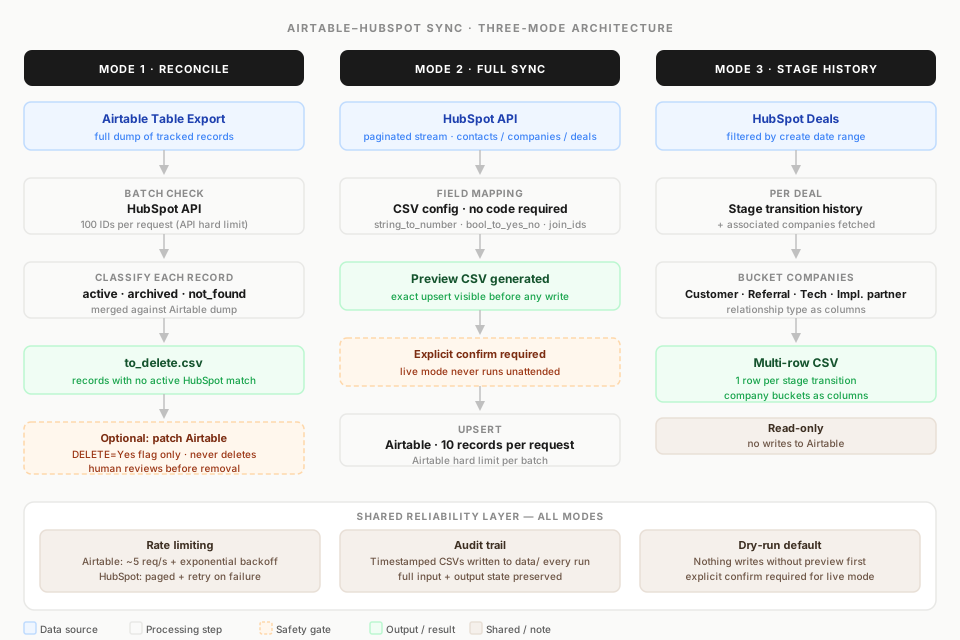
A Python CLI tool with three distinct modes, all accessible via python main.py. It asks one question at a time and produces CSV outputs before making any live changes. Dry-run is the default on anything that writes data.
Mode 1: Reconcile
Exports records from an Airtable table, then batch-checks each HubSpot ID against the CRM (100 IDs per request, the HubSpot API hard limit). Each record comes back classified as active, archived, or not_found. The tool merges this against the Airtable dump and produces a to_delete CSV of anything that no longer has a corresponding active record in HubSpot.
From there, an optional step patches Airtable to mark those records with DELETE=Yes. Nothing is ever deleted, only flagged, so a human reviews before anything is removed.
Mode 2: Full Sync
Streams all non-archived HubSpot objects (contacts, companies, or deals) using paginated API calls, applies field mapping rules loaded from a CSV config, and upserts the result into Airtable. The mapping config defines how each HubSpot property translates to an Airtable field, including transforms like string_to_number, bool_to_yes_no, and join_ids.
The config lives in a CSV file, not the code. That was a deliberate decision: the people who need to adjust field mappings shouldn’t have to touch Python to do it.
Before any data is written, a preview CSV is generated showing exactly what would be upserted. Live mode requires an explicit confirmation step.
Mode 3: Deal Stage History Export
Filters deals by create date range, fetches the full stage transition history for each deal along with associated companies, then buckets those companies by relationship type: customer, referral partner, technology partner, implementation partner. The output is a multi-row CSV: one row per stage transition, with company buckets as columns, ready for analysis.
This mode makes no writes to Airtable; it’s purely a reporting export.
How the reliability works
Both APIs have strict rate limits and occasional failures. The tool handles this at two layers:
- Airtable: paced to around five requests per second, with exponential backoff and jitter on any 429 response. Upserts are batched at ten records per request, Airtable’s hard limit.
- HubSpot: batch reads process up to 100 IDs at a time. Paginated calls use light pacing with retry logic on failures.
Every run writes timestamped CSV files to a local data/ folder: the Airtable export, the HubSpot status results, the to_delete list, the upsert preview. These aren’t just debugging artifacts; they’re the audit trail. If a run ever needs to be reviewed or rolled back, the full input and output state is preserved.
The result
- CRM data drift is now detectable and fixable on demand rather than something that silently compounds over time
- The reconciliation process that previously required manual export, comparison, and cleanup is reduced to a single command
- All field mappings are maintainable in a CSV, with no code changes needed when HubSpot or Airtable fields change
- Every sync is auditable before it goes live: the preview CSV makes the exact changes visible before confirmation
What made this worth building carefully
The temptation with a sync tool is to make it fast and automatic. The decision here was to make it safe and auditable instead. Dry-run default, CSV previews, no deletes, ever. The tool does exactly what it says it’s going to do, and you can verify that before it does it.
That constraint also makes it easier to extend. Adding a new object type (contacts, companies, deals) is a matter of adding a mapping CSV, not changing the logic. The architecture earned its rigidity.