From Free-Text to CRM Tags: AI-Powered Lead Intelligence
Built an automated pipeline that reads free-text lead enquiries, extracts the systems prospects mention, and writes structured tags back to HubSpot — giving sales, CS, and partnerships teams instant visibility into every lead's tech stack.
The situation
When someone fills in a HubSpot form to enquire about Patchworks, they describe their integration need in their own words. “We use Magento 2 and need to connect it to our ERP.” “We’re looking to link Linnworks with Zendesk.” “We’re on Shopify — can you connect NetSuite?”
That’s useful information. The problem is that it arrives as unstructured text, not structured data. Nobody was extracting system names from those messages in any systematic way — the sales, CS, and partnerships teams were reading enquiries individually, with no way to filter, segment, or route by the systems a prospect actually mentioned.
The ask was straightforward: could we automate it? The answer was yes.
The problem
The business had a clear intelligence need: when a new lead comes in, which systems are they using and which do they want to connect? This drives which partners to introduce, which specialist to assign, and how to prioritise the conversation.
But the data didn’t exist in structured form anywhere. It lived in free-text message fields — inconsistently written, unreliably read, never extracted. There was no way to ask HubSpot “show me all leads that mentioned Shopify” because Shopify was never written to a field. It was buried in a body of text.
Compounding this: humans don’t write system names consistently. “NetSuite” arrives as netsuite, net suite, NetSuite, NS, netsuite crm, and a dozen other variations depending on who’s typing. Any extraction system that didn’t account for this would produce noise rather than signal.
What I built
An automated pipeline that:
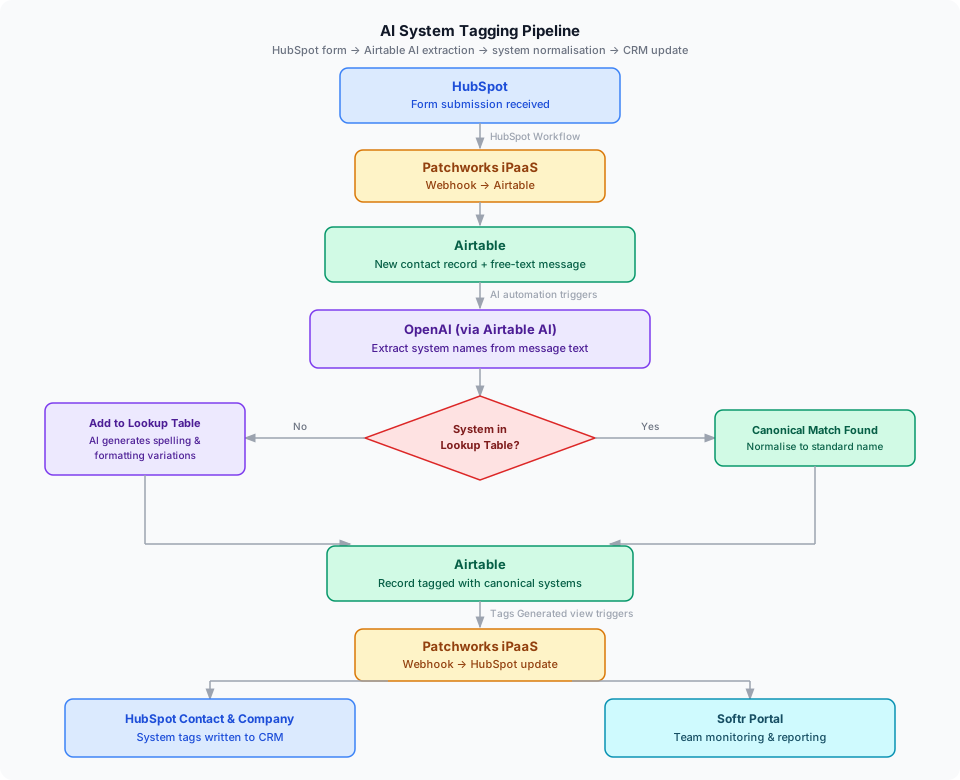
- Picks up every new HubSpot form submission via a HubSpot Workflow
- Sends the contact data — including the free-text message — to Airtable via Patchworks
- Runs an OpenAI prompt in Airtable to extract system names from the message
- Compares extracted names against a System Lookup table of canonical names and known variations
- Tags the Airtable record with correctly normalised system names
- Writes those tags back to the HubSpot contact and company via Patchworks
Sales, CS, and partnerships teams can filter directly in HubSpot by system — or view a live monitoring interface in Softr that shows all recently tagged contacts alongside the full lookup table.
How it works
Ingest
When a prospect submits a HubSpot form, a HubSpot Workflow fires immediately and sends the contact data — including the free-text integration notes field — to Airtable via a Patchworks webhook. A new record is created in the lead table with the raw message intact.
AI extraction
An Airtable automation triggers on the new record. It passes the free-text message to OpenAI with a prompt designed to pull out system names — eCommerce platforms, ERPs, 3PLs, marketplaces, any tool the prospect mentioned. The output is a clean list of extracted names written back to the record.
Normalisation via System Lookup
This is the part that makes extraction actually useful. A separate Lookup table stores every known system as a canonical name (e.g. NetSuite) alongside every variation it’s been seen written as (netsuite, net suite, NS, net_suite, and so on).
When the pipeline compares extracted names against this table:
- Match found: the canonical version is used, regardless of how the prospect typed it
- No match: the system is added as a new canonical entry, and a second AI automation generates a set of common spelling and formatting variations for it automatically
The lookup table grows over time without manual intervention. The first time an unfamiliar system appears, it gets captured and trained. Every subsequent occurrence — in any of its known forms — gets matched correctly.
Tagging and HubSpot update
Once the record has been tagged with canonical system names in Airtable, it enters a filtered view called “Tags Generated”. This triggers a webhook automation that runs a custom script via Patchworks, pushing the system tags back to both the HubSpot contact and company records as structured, filterable properties.
The data lands in HubSpot in a usable form — not buried in a notes field.
Monitoring
A Softr portal gives the team two views: a live list of recently tagged contacts with their assigned system tags, and the full Lookup Table for reviewing and managing canonical entries. The team can add new systems, review AI-generated variations, or flag anything that’s been miscategorised — without touching Airtable directly.
The result
- Every new HubSpot lead is automatically tagged with the systems they mentioned — no manual reading or tagging required
- Tags are written to both the contact and company record in HubSpot, making filtering and segment-building reliable for the first time
- The partnerships team can immediately see which partner to loop in based on a prospect’s tech stack, without reading every message
- The lookup table self-expands: new systems are captured and their variations generated automatically, so matching improves continuously without ongoing maintenance
What made this interesting to build
Running an LLM over a form message and getting a word list back is straightforward. Getting a consistent, deduplicated, canonically-named set of system tags — regardless of how someone happened to type “NetSuite” that morning — requires the lookup layer.
The combination of AI extraction and a structured variation table separates two distinct problems: the language understanding problem (what is this person talking about?) and the data quality problem (what is the agreed name for it?). Each step can be reviewed and corrected independently, which matters when you’re writing structured data back to a CRM that other people depend on.
The Softr monitoring layer was a deliberate addition — not for the pipeline itself, but so the team could see what the system was doing and trust it. Visibility builds confidence in automation, especially when AI is involved.